The New Version of DropSend Outlook Plugin Is Ready
For the last couple of weeks we’ve been working on the new version of the DropSend Outlook Plugin. Our main goal was to make it faster, more reliable, and add some features that we thought our users would appreciate. Here’s what’s new in the latest version of the Outlook plugin:
- Microsoft Outlook 2013 support
- A feature to protect attachments and uploaded files with a password
- New options that allow you to set file expiration and download limits
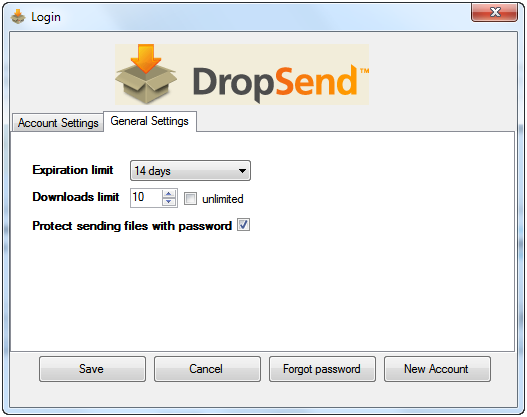
Now you will be able to set a password for the files you are uploading and configure additional settings, such as expiration and download limits, from the General Settings tab:
Another improvement we’ve been working on is speed because we know that nothing is more frustrating than waiting for hours for your files to upload. Well, we have some good news because now uploading files using the plugin is faster by 20%.
We haven’t uploaded the new version yet because we still have some stuff that needs patching up. But we will upload it soon, so keep an eye out for the new version!

